
January 16, 2026
WHAT'S HAPPENING: Updates to Microsoft 365 Pricing and Features
WHEN: July 1, 2026
Microsoft announced that starting July 1, 2026, it will expand AI, security, and management features across its Microsoft 365 offerings, along with updating commercial pricing.
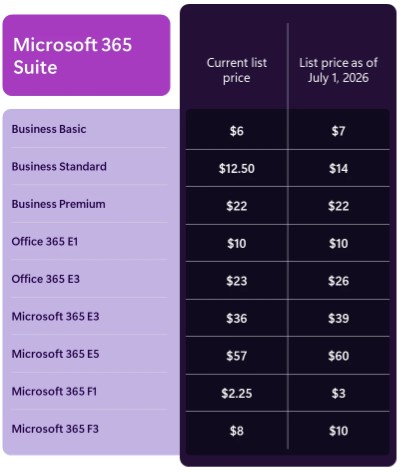
Key updates include:
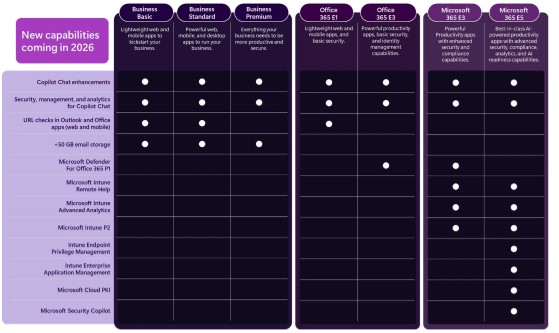
- Microsoft 365 Copilot Chat is being rolled out in apps like Word, Excel, PowerPoint, Outlook, and OneNote, offering secure AI chat integrated into daily work. It will soon understand inboxes and calendars and provide advanced collaboration features, with enterprise-grade controls for IT administrators.
- Enhanced email security features from Microsoft Defender for Office 365 Plan 1 will be added to Office 365 E3 and Microsoft 365 E3, improving protection against phishing, malware, and malicious links. URL checks will also be included in Office 365 E1, Business Basic, and Business Standard.
- New endpoint management tools such as Microsoft Intune Remote Help, Advanced Analytics, and Plan 2 will be added to Microsoft 365 E3 and E5, helping IT teams detect issues faster and maintain device productivity. Additional security features for E5 customers will safeguard AI use and strengthen compliance.
- Security Copilot agents will be integrated into workflows for security teams using Microsoft Defender, Entra, Intune, and Microsoft Purview, available to all Microsoft 365 E5 customers with advance notice.
The pricing changes will apply globally with local adjustments and affect new and renewing customers from July 2026, with existing customers seeing changes at their next renewal. You can read the announcement here.
WHAT'S HAPPENING: Security Copilot Capacity Credits being rolled out to Microsoft 365 E5 customers
WHEN: January 5, 2026
Security Copilot capacity is being added to Microsoft 365 E5, providing 400 Security Compute Units (SCUs) per 1,000 users, scaled proportionally for any tenant size. SCUs function as the compute power behind Security Copilot AI workloads, reset monthly, are shared across all workspaces, and reduce usage charges compared to provisioned billing models. On January 5, 2026, eligible Microsoft E5 customers Security Copilot were automatically included, with zero-click activation (Security Copilot is automatically provisioned). This means no Azure setup is needed or capacity provisioning required. Eligible customers can start using Security Copilot right away. All M365 E5 customers are eligible, and existing Security Copilot.
WHAT'S HAPPENING: Microsoft 365 Copilot Business Released
WHEN: December 1, 2025
Microsoft is launching a new product called Microsoft 365 Copilot Business, designed to help small and medium-sized businesses by integrating AI capabilities. This product will be available worldwide starting December 1, 2025. It supports up to 300 users per business and costs $21 per user per month (USD MSRP). Microsoft 365 Copilot Business can be bundled with existing Microsoft 365 plans, including Business Basic, Business Standard, and Business Premium.
WHAT'S HAPPENING: Free Grace Period being replaced with paid Extended Service Term on CSP
WHEN: April 1, 2026
Starting April 1, 2026, the free grace period for Microsoft subscription licenses will be eliminated, meaning customers must either cancel immediately or enter a paid Extended Service Term (EST) to keep services running. EST introduces three options—renew, cancel, or move to EST.
WHAT'S HAPPENING: EA Customers now able to Initiate Change of Channel Partner Requests
WHEN: November, 2025
Starting November 2025, Enterprise Agreement (EA) Azure customers can initiate a Change of Channel Partner (COCP) themselves through the Azure portal, shifting this ability from partners to customers.
To start a COCP, customers need two key pieces of information from the new partner: the partner's Public Customer Number (PCN) and the email address of a partner notification contact. The PCN is mandatory and can be found by the partner in the VL Central Contracts workspace. The notification contact is the person who will receive emails about the COCP request and handle communications. If the correct contact email is not provided or cannot be verified, Microsoft will not send automatic notifications, so customers must inform their new partner manually.
Only Enterprise Administrators on active EA or EA Subscription agreements can initiate COCP requests via the Azure portal. Non-EA programs and agreements with expired status or certain billing arrangements are not eligible. The COCP process involves selecting eligible billing accounts (up to 20) and providing the new partner’s PCN, notification contact email, and a reason for the change (such as unsatisfactory service or partner offboarding).
After submission, the new partner has 10 days to accept or decline the request. If accepted, the customer is notified along with the effective date, which defaults to 90 days from initiation. Customers can request an earlier date through a separate form submitted by the partner. The Azure portal provides status tracking for COCP requests with statuses like In Progress, Accepted, Declined, Pending Review, Grace Period, Canceled, Expired, and Completed. The effective date marks when the new partner can start placing orders on the agreement.
WHAT'S HAPPENING: Changes to Visual Studio Update Channels
WHEN: November 11, 2025
With the release of Visual Studio 2026, Microsoft has changed the release model for this product. The longrunning Preview Channel is being retired and replaced with a new Insiders Channel, which is now the goto spot for early access to upcoming features. The Stable Channel will continue delivering fully validated, productionready updates on a monthly cadence. Microsoft is also moving this product to a predictable annual release: every November, Visual Studio will automatically shift to the next yearly version. There will also be a LongTerm Servicing Channel (LTSC) for the previous year’s release. That edition locks in a fixed feature set for a full year while still receiving security updates. For the Professional and Enterprise editions, if you have a Visual Studio Subscription, there’s no change to the registration process. You will continue signing in as before and automatically receive updates through the modern lifecycle or obtain your product key from the Visual Studio Subscribers portal. If you use a stand-alone Professional license, you simply purchase the new annual version each year. Product keys will continue to work for that annual version, and new keys will unlock the next year’s release. There are no changes to the product lifecycle for existing past versions of Visual Studio.
WHAT'S HAPPENING: Windows 365 Cloud Apps now available
WHEN: November 18, 2025
Windows 365 Cloud Apps is now available. This product allows administrators to provide users with secure access to individual apps hosted on a shared Cloud PC, so each user doesn't need their own dedicated Cloud PC. These apps run on Windows 365 Frontline Cloud PCs in shared mode, requiring Windows 365 Frontline licenses. To create Cloud Apps, a Windows 365 Frontline license is necessary.
WHAT'S HAPPENING: Windows 365 Reserve now available
WHEN: November 18, 2025
Windows 365 Reserve licenses offer short-term Cloud PC access for business continuity and other temporary needs, providing up to 10 days of access per user each year. These licenses are purchased through Microsoft Sales and managed at the tenant level, not assigned to individual users in the Microsoft 365 admin center. Instead, licenses are assigned to Microsoft Entra user groups via provisioning policies created in Microsoft Intune.
To use Windows 365 Reserve, users must have licenses for Windows 11 or 10 Enterprise, Microsoft Intune, and Microsoft Entra ID P1, which are included in various Microsoft 365 subscriptions like E3, E5, F3, A3, A5, Business Premium, and Education Student Use Benefit.
Each license grants one user up to 10 days of Cloud PC access during the license term, measured in 24-hour increments starting when the Cloud PC is provisioned. Access days can be used consecutively or spread out. Licenses cannot be shared or pooled among users.
After assigning a license, there is a seven-day waiting period before the Cloud PC can be provisioned for the user, applicable only the first time or after a lapse in coverage. Admins should assign licenses early to avoid delays.
License reassignment is managed by changing group memberships in Entra. If a Cloud PC was never provisioned, removing a user returns the license to the pool; if provisioned, the license remains assigned until the term ends and cannot be reassigned. Unused access days expire at the end of the license term and stacking or extensions of licenses are not supported.
WHAT'S HAPPENING: Copilot Credits being Added to Select Dynamics 365 Plans
WHEN: November 25, 2025
To support adoption of pre-built AI agents, Dynamics 365 Premium SKUs will include 1,000 Copilot Credits per user for Sales, Customer Service, Finance, and Supply Chain Management starting November 25, 2025.
WHAT'S HAPPENING: Flexible Dataverse capacity model introduced for for apps and agents
WHEN: December 4, 2026
Microsoft is increasing the default Dataverse storage included with Dynamics 365 and Power Platform subscriptions and is merging ERP (Finance & Operations) and Dataverse storage into one shared entitlement. This removes the old separate caps, gives customers more usable storage—especially for Finance Premium and Supply Chain Premium—and reduces how often you may need to buy addon capacity. No action is required, the updated entitlements will appear automatically in the Power Platform admin center if applicable.
WHAT'S HAPPENING: Dynamics 365 Guides and Remote Assist End of Support on December 31, 2026
WHEN: December 31, 2026
Dynamics 365 Guides and Dynamics 365 Remote Assist will reach end of support on December 31, 2026. After this date, 31, 2026 these products will no longer receive security updates, non-security updates, bug fixes, or technical support. Microsoft recommends that customers identify users and scenarios that rely on Dynamics 365 Guides or Dynamics 365 Remote Assist and prepare to move before this date. A variety of mixed-reality solutions are available on the Microsoft Marketplace that may meet your organizational needs. Certain Remote Assist scenarios may be supported using the "spatial annotation" feature in Microsoft Teams Mobile.
WHAT'S HAPPENING: End of Support for Office Online Server
WHEN: December 31, 2026
Microsoft has announced the end of support and retirement for Office Online Server effective December 31, 2026. After this date, Office Online Server will no longer receive security updates, bug fixes, or technical support from Microsoft. Microsoft recommends migrating to supported options, such as Microsoft 365.
WHAT'S HAPPENING: Microsoft will not be releasing any new versions of Biztalk Server after 2020 version
WHEN: April 11, 2028
Microsoft has advised that there will be no future releases of Biztalk Server. The recommendation is modernization with services such as Azure Logic Apps (part of Azure Integration Services), which includes API Management, Service Bus, and Event Grid. Biztalk Server 2020 reaches end of mainstream support on April 11, 2028 and Extended Support on April 9, 2030. Paid Extended Support will be available for BizTalk Server 2020 between April 2028 and April 2030 for customers requiring hotfixes for non-security updates.